# Snom M25/M30/M65/M70/M80/M85

# Anrufweiterleitung

#### <span style="font-weight: bolder;">1.0 Anruf halten</span>

<span style="font-family: Symbol;">·<span style="font-variant-numeric: normal; font-variant-east-asian: normal; font-stretch: normal; font-size: 7pt; line-height: normal; font-family: 'Times New Roman';"> </span></span>Den Anruf annehmen

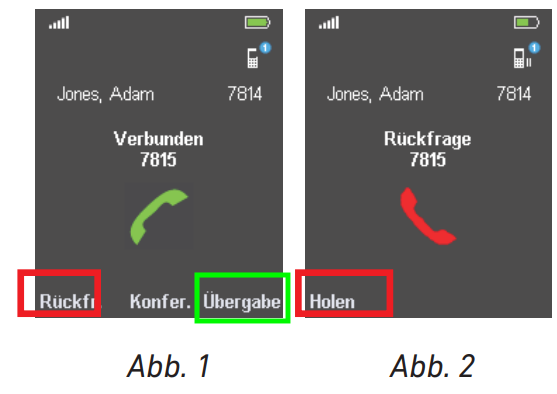
<span style="font-family: Symbol;">·<span style="font-variant-numeric: normal; font-variant-east-asian: normal; font-stretch: normal; font-size: 7pt; line-height: normal; font-family: 'Times New Roman';"> </span></span>Drücken Sie die Taste „Rückfr“ für den Wartezustand <span style="color: rgb(224, 62, 45);">(Abb. 1) </span>

<span style="font-family: Symbol;">·<span style="font-variant-numeric: normal; font-variant-east-asian: normal; font-stretch: normal; font-size: 7pt; line-height: normal; font-family: 'Times New Roman';"> </span></span>Um den Wartezustand zu beenden drücken Sie die Taste "Holen" <span style="color: rgb(224, 62, 45);">(Abb. 2)</span>

[![R935kJN5Yx484hJ_28_04_2021_13_39_44.png](https://wiki.com4all.ch/uploads/images/gallery/2026-03/scaled-1680-/REtJx7700SosaPlS-r935kjn5yx484hj-28-04-2021-13-39-44.png)](https://wiki.com4all.ch/uploads/images/gallery/2026-03/REtJx7700SosaPlS-r935kjn5yx484hj-28-04-2021-13-39-44.png)[ ](https://wiki.com4all.ch/uploads/images/gallery/2026-03/ElGY17UDgZb9HLMV-r935kjn5yx484hj-28-04-2021-13-39-44.png)[![R935kJN5Yx484hJ_28_04_2021_13_39_44-1.png](https://wiki.com4all.ch/uploads/images/gallery/2026-03/scaled-1680-/yOeXex2iTufFGjxB-r935kjn5yx484hj-28-04-2021-13-39-44-1.png)](https://wiki.com4all.ch/uploads/images/gallery/2026-03/yOeXex2iTufFGjxB-r935kjn5yx484hj-28-04-2021-13-39-44-1.png)
#### <span style="font-weight: bolder;">2.0 Anruf weiterleiten</span>

##### <span style="font-weight: bolder;">2.1 Mit Ankündigung</span>

<span style="font-family: Symbol;">·<span style="font-variant-numeric: normal; font-variant-east-asian: normal; font-stretch: normal; font-size: 7pt; line-height: normal; font-family: 'Times New Roman';"> </span></span>Nehmen Sie den Anruf an

<span style="font-size: 1rem; font-family: Symbol;">·<span style="font-variant-numeric: normal; font-variant-east-asian: normal; font-stretch: normal; font-size: 7pt; line-height: normal; font-family: 'Times New Roman';"> </span></span><span style="font-size: 1rem;">Drücken Sie die Taste "Rückf" für den Wartezustand <span style="color: rgb(224, 62, 45);">(Abb. 1)</span></span>

<span style="font-size: 1rem; font-family: Symbol;">·<span style="font-variant-numeric: normal; font-variant-east-asian: normal; font-stretch: normal; font-size: 7pt; line-height: normal; font-family: 'Times New Roman';"> </span></span><span style="font-size: 1rem;">Wählen Sie die Zielnummer des anderen Anschlusses</span>

<span style="font-family: Symbol;">·<span style="font-variant-numeric: normal; font-variant-east-asian: normal; font-stretch: normal; font-size: 7pt; line-height: normal; font-family: 'Times New Roman';"> </span></span>Kündigen Sie den Anruf, den Sie durchstellen wollen, an.

<span style="font-family: Symbol;">·<span style="font-variant-numeric: normal; font-variant-east-asian: normal; font-stretch: normal; font-size: 7pt; line-height: normal; font-family: 'Times New Roman';"> </span></span> Drücken Sie die Taste "Übergabe"<span style="color: rgb(45, 194, 107);">(Abb. 1) </span>um den Anruf zu übergeben


##### <span style="font-weight: bolder;">2.2 Ohne Ankündigung</span>

<span style="font-family: Symbol;">·<span style="font-variant-numeric: normal; font-variant-east-asian: normal; font-stretch: normal; font-size: 7pt; line-height: normal; font-family: 'Times New Roman';"> </span></span>Nehmen Sie den Anruf an

<span style="font-size: 1rem; font-family: Symbol;">·<span style="font-variant-numeric: normal; font-variant-east-asian: normal; font-stretch: normal; font-size: 7pt; line-height: normal; font-family: 'Times New Roman';"> </span></span><span style="font-size: 1rem;">Drücken Sie die Taste "Übergabe" für den Wartezustand <span style="color: rgb(45, 194, 107);">(Abb. 1)</span></span>

<span style="font-size: 1rem; font-family: Symbol;">·<span style="font-variant-numeric: normal; font-variant-east-asian: normal; font-stretch: normal; font-size: 7pt; line-height: normal; font-family: 'Times New Roman';"> </span></span><span style="font-size: 1rem;">Wählen Sie die Zielnummer des anderen Anschlusses</span>

<span style="font-family: Symbol;">·<span style="font-variant-numeric: normal; font-variant-east-asian: normal; font-stretch: normal; font-size: 7pt; line-height: normal; font-family: 'Times New Roman';"> </span></span> Drücken Sie die Taste "Übergabe" um den Anruf zu übergeben

#### <span style="font-weight: bolder;">3.0 Konferenzgespräche</span>

<span style="font-family: Symbol;">·<span style="font-variant-numeric: normal; font-variant-east-asian: normal; font-stretch: normal; font-size: 7pt; line-height: normal; font-family: 'Times New Roman';"> </span></span>Nehmen Sie den Anruf des Teilnehmers 1 an

<span style="font-family: Symbol;">·<span style="font-variant-numeric: normal; font-variant-east-asian: normal; font-stretch: normal; font-size: 7pt; line-height: normal; font-family: 'Times New Roman';"> </span></span><span style="font-size: 1rem;">Drücken Sie die Taste "Rückf" für den Wartezustand <span style="color: rgb(224, 62, 45);">(Abb. 1) </span>und wählen Sie die Zielnummer des Teilnehmers 2</span>

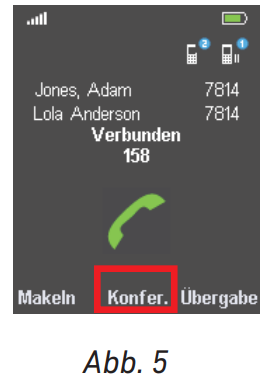
<span style="font-family: Symbol;">·<span style="font-variant-numeric: normal; font-variant-east-asian: normal; font-stretch: normal; font-size: 7pt; line-height: normal; font-family: 'Times New Roman';"> </span></span>Wenn Sie mit beiden Teilnehmern verbunden sind drücken Sie die Taste "Konfer" <span style="color: rgb(224, 62, 45);">(Abb. 5)</span>